
Label, export or delete many chats at once
Tick the chats you want and an action bar appears at the bottom. Its Action menu opens, labels, favorites, exports or deletes the whole selection.
4 steps2 minVideo walkthrough
Why it matters
Cleaning up after a busy week means 30 test chats to delete and 12 research chats to label. One at a time that is 42 trips through a menu. With a selection it is two.
Step by step
- 1
Select chats
Tick the checkbox on each chat. To select the whole result list, across pages, click Select All, the leftmost button in the filter bar.
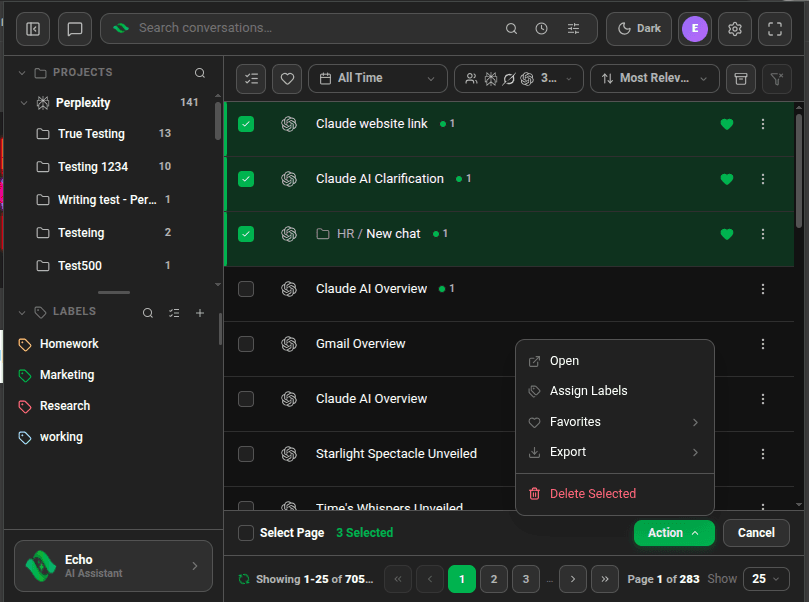
Three conversations selected, action bar at the bottom with the Action menu open - 2
Open the Action menu
The bar at the bottom shows how many chats you selected. Click Action to see Open, Assign Labels, Favorites, Export and Delete Selected. Chats on ChatGPT, Claude, Grok or Perplexity also get Move to Project.
- 3
Run the action
Pick the action. Assign Labels opens the Batch Label Assignment dialog: tick labels, click Assign Labels and confirm. Export asks for a format. Delete Selected asks you to confirm.
- 4
Clear the selection
Click Cancel in the action bar.

Good to know
| Plan | Limit |
|---|---|
| Lite (free) | Labels: 5 chats at a time. Export: 5 chats a month. Delete: 10 chats at a time |
| Plus & Lifetime | Delete: 300 chats at a time. ChatGPT export: 50 chats at a time |
- Delete Selected deletes the chats on the platform as well as in Echoes.
- You can also drag a selection onto a label, or onto the Favorite or Delete targets that appear while you drag.
- Open opens up to your Maximum new tabs setting, 15 by default.
FAQ
Does Delete Selected remove chats from ChatGPT?
Yes. Echoes deletes them on the platform: ChatGPT hides them, and Claude, Gemini, Grok, Perplexity, DeepSeek and AI Studio delete them. Export anything you want to keep first.
Related tutorials
- ExtensionDesktopExport chats to Markdown, HTML or JSONDownload one chat or a batch as files you own.
- ExtensionDesktopOrganize chats with labels and sublabelsCreate colored labels, nest them, and tag chats from any AI by menu or by dragging.
- ExtensionOpen several chats in tabs at onceSelect chats and open each in its own browser tab in one click.
Try it in Echoes
The free Lite plan covers all seven AI platforms. No card needed.