
Extension
FreeOpen several chats in tabs at once
Tick the chats you want and choose Action → Open. Echoes opens each one in a new tab on its platform, up to your Maximum new tabs setting.
3 steps2 minVideo walkthrough
Why it matters
You're picking up a project spread over five chats on three platforms. Opening them one by one means five searches. Select them in Echoes and they open together, ready to read side by side.
Step by step
- 1
Select the chats
Tick the checkbox on each chat you want to open.
- 2
Choose Action → Open
Click Action in the bar at the bottom, then Open. Each chat opens in its own tab.
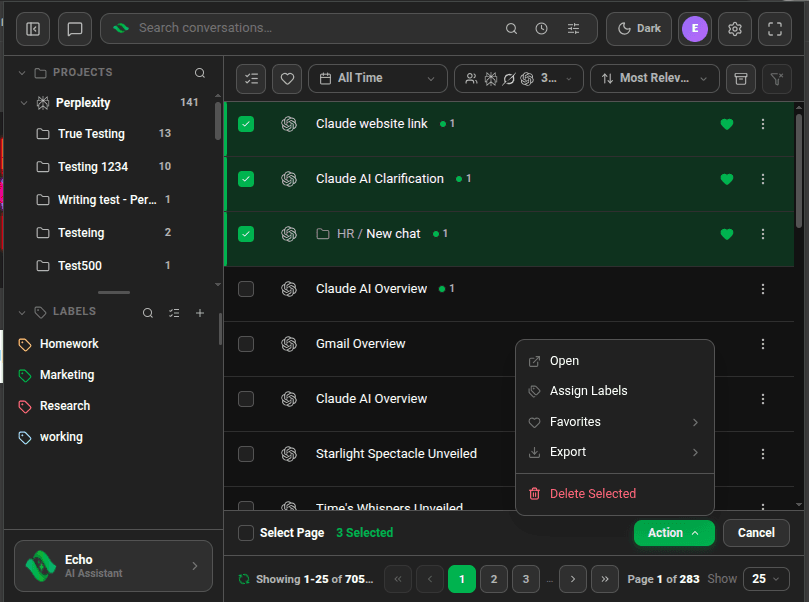
Action menu with Open at the top - 3
Open one chat in a new tab
For a single chat,
Ctrl+click it (⌘+click on Mac), or choose Open in New Tab from its ⋮ menu.

Good to know
| Plan | Limit |
|---|---|
| Lite (free) | Up to 15 tabs at once |
| Plus & Lifetime | Set your own limit, from 1 to 100 |
- On Plus, change the limit in Settings → General → Maximum new tabs. Dozens of tabs can slow Chrome down.
- ChatGPT opens chats from one account at a time. Select ChatGPT chats from a single account.