
 Desktop
One app. Every AI platform.
Echoes Desktop brings ChatGPT, Claude, Gemini, Grok, Perplexity, DeepSeek, and AI Studio into one place, and keeps every conversation you sync in a database on your own machine.
Latest stable build · Windows, macOS & Linux
The beta gets new features first. Join the beta
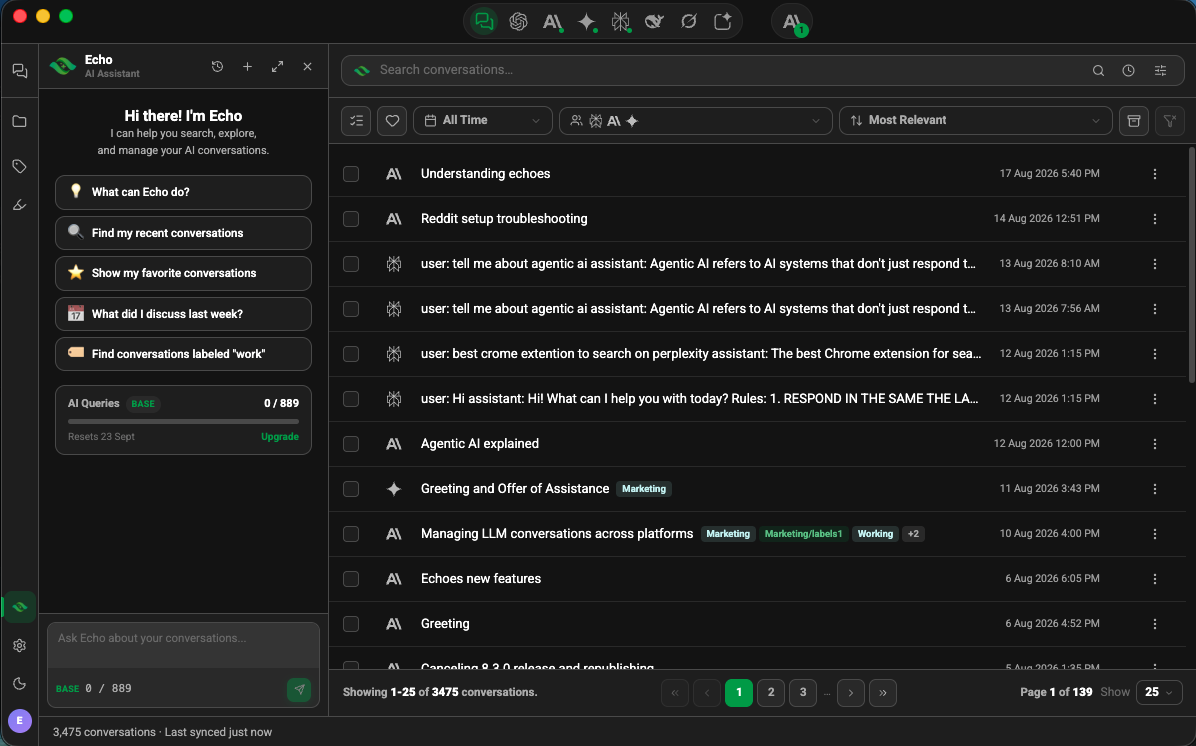
One Library
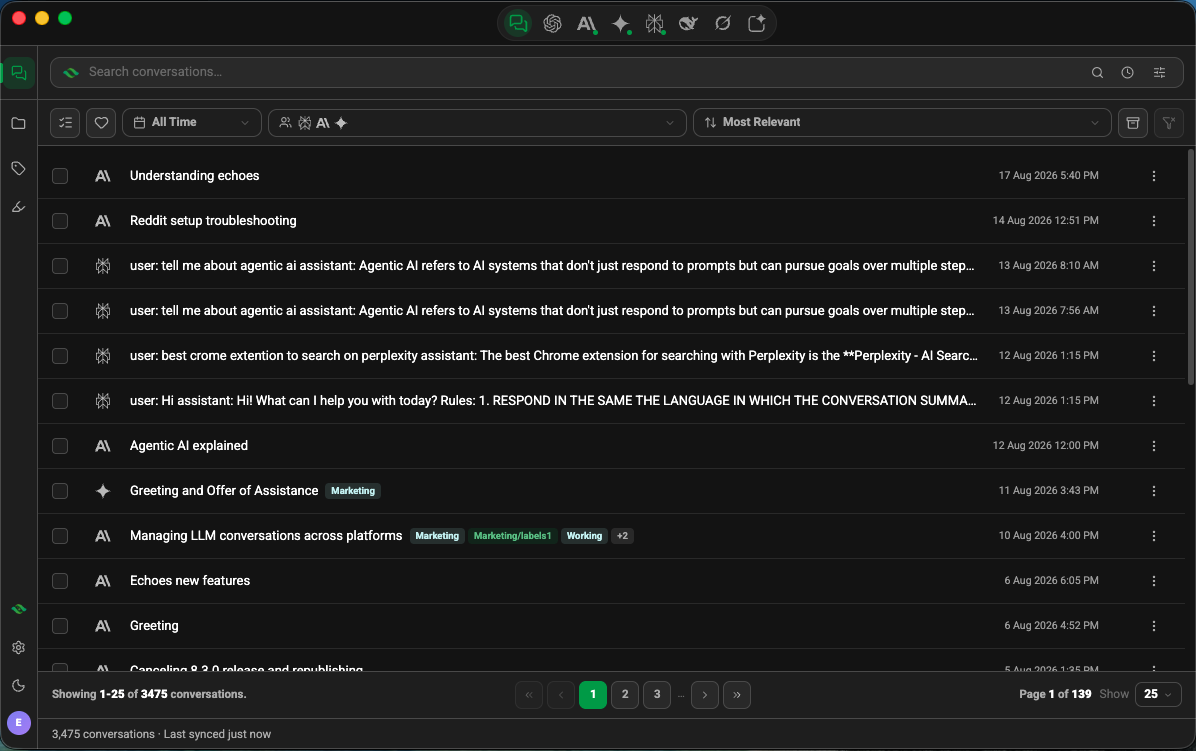
Read and manage conversations from all seven platforms in a single app.
One Library
Read and manage conversations from all seven platforms in a single app.
Chat In The App
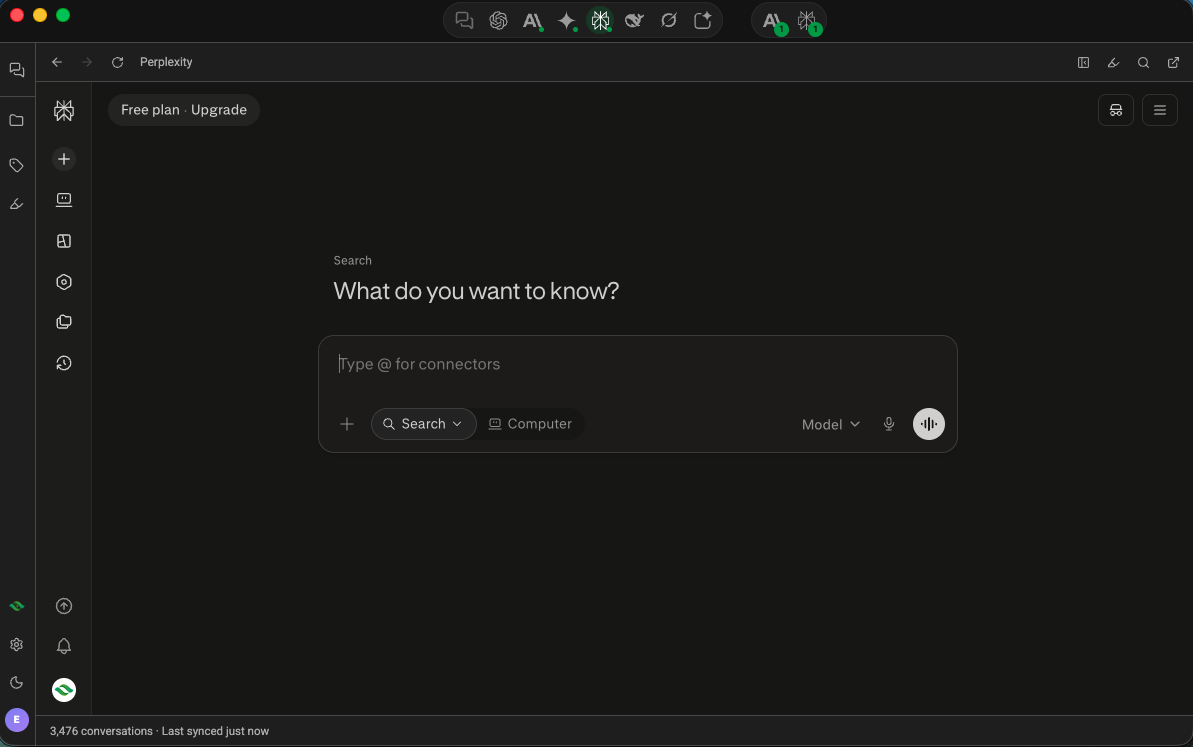
Talk to any supported AI platform inside Echoes Desktop, without opening a browser tab.
Multiple Chats At Once
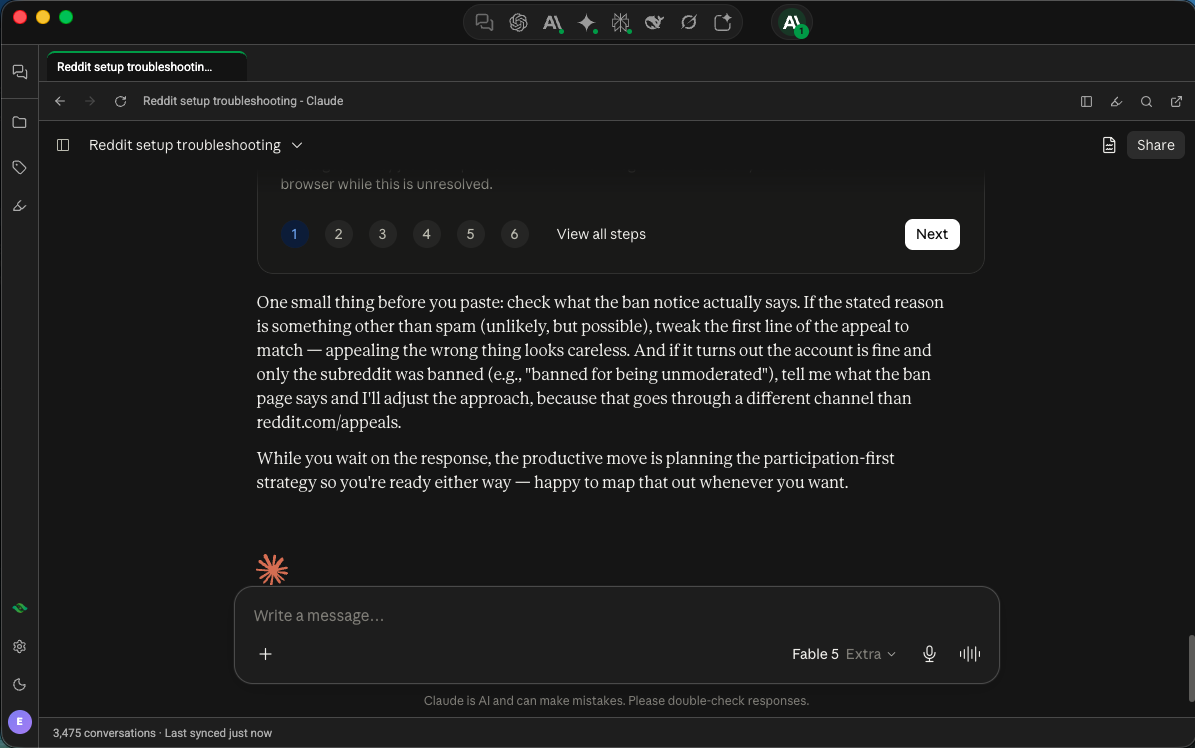
Open several conversations side by side, which the browser extension cannot do.
Highlight & Revisit
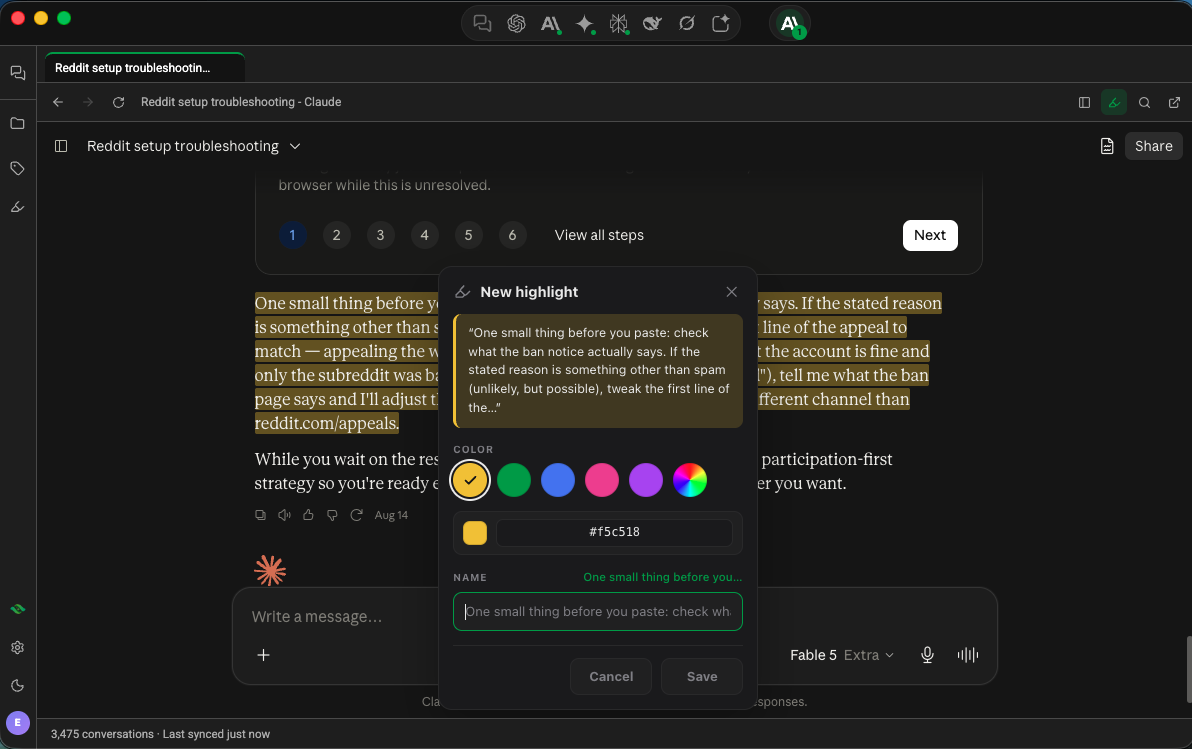
Highlight a passage in a conversation and jump back to it later.
Echoes AI Support
Built-in AI support that answers questions about Echoes while you work.
One app for seven AI platforms
Chat with ChatGPT, Claude, Gemini, Grok, Perplexity, DeepSeek, and AI Studio in one window, instead of seven browser tabs.
Keep using the official websites
Chat on chatgpt.com or claude.ai the way you do now. Echoes Desktop syncs those conversations into the same library.
Your conversations stay on your computer
Echoes Desktop writes every conversation you sync to a database on your own machine. You can still read them after a platform hides old chats, or while you are offline.
The search and labels from the extension
Search all seven platforms at once, and file conversations under Projects and Labels.
Continue a chat in another AI
If Claude runs out of messages halfway through a chat, choose Continue in, then ChatGPT. Echoes opens a new ChatGPT chat with your conversation in the message box, and you press Send.
Echo answers on your computer
Echoes Desktop ships its own AI runtime and downloads a model of about 1 GB in the background. Echo then answers on your machine, and your question stays there. You need 8 GB of RAM.
How it works
Chat wherever you prefer
Use the AI platforms inside Echoes Desktop, or keep using the official websites in your browser. Both work, so you do not have to change how you already work.
Echoes Desktop syncs it
Echoes Desktop collects the conversations you have on the official websites, so chats from all seven platforms end up in one library.
It stays on your machine
Echoes Desktop writes each synced conversation to a database on your computer, then makes it searchable and sortable with Projects and Labels.
What Echoes Desktop does
- Echoes Desktop manages AI conversations from different platforms in one place.
- You can chat with ChatGPT, Claude, Gemini, Grok, Perplexity, DeepSeek, and AI Studio from one desktop app.
- You can open several AI conversations side by side in a single window.
- You sign in with your own existing account on each AI platform. Echoes does not replace those accounts.
- You can keep using the official AI websites, and Echoes Desktop syncs those conversations.
- Echoes Desktop stores every conversation you sync in a local database on your own machine.
- Synced conversations stay readable after a platform removes old chats, or while you are offline.
- You can search across every conversation from every supported platform.
- You can organize conversations with Projects and Labels.
- You can continue a conversation on a different AI platform. Echoes Desktop pastes it into a new chat there, and you decide whether to send it.
- The Echo assistant can answer on your own computer, using a model Echoes Desktop downloads for you.
- Echoes Desktop is local-first: your conversation database stays on your machine.
The seven platforms Echoes supports
The same seven the Echoes browser extension supports.


Questions
- Is there an app that manages AI conversations from different platforms in one place?
- Yes. Echoes Desktop brings ChatGPT, Claude, Gemini, Grok, Perplexity, DeepSeek, and Google AI Studio together in one app. It collects the conversations you have on those platforms into one searchable library, stored in a database on your own computer, and lets you organize them with Projects and Labels. Echoes also ships as a Chrome extension.
- Can I chat with ChatGPT, Claude, and Gemini from one desktop app?
- Yes. Echoes Desktop lets you chat with ChatGPT, Claude, Gemini, Grok, Perplexity, DeepSeek, and Google AI Studio from a single window, and you can keep several conversations open side by side. You sign in with your own account on each platform. Echoes does not resell access to the AI platforms, and does not replace your accounts with one of its own.
- When is Echoes Desktop available?
- Echoes Desktop is released. You can download it from the Echoes Desktop page, which always serves the latest stable build, so there is no version to choose. Windows users install it from the Microsoft Store. macOS and Linux users download it from the same page. The beta programme gets new features before they reach stable.
- Do I have to stop using the AI platforms in my browser?
- No. You can keep chatting on the official websites the way you do today. Echoes Desktop syncs those conversations, so they sit alongside the ones you start in the app.
- Where are my conversations stored?
- Echoes Desktop stores every conversation you sync in a database on your own computer. It is local-first by design, so your conversation database stays on your machine.
- Which AI platforms does Echoes Desktop support?
- ChatGPT, Claude, Gemini, Grok, Perplexity, DeepSeek, and Google AI Studio. The same seven the Echoes browser extension supports.
- Can the AI assistant run on my own computer?
- Yes. On-device AI is a desktop-only feature. Echoes Desktop ships its own AI runtime and downloads a small model in the background the first time you run it, so there is nothing to install and no API key to paste. Once it is ready, the Echo assistant answers on your machine instead of sending your request to a cloud model. If you already run Ollama, Echoes uses that installation and skips the download. Each question counts toward your Echo AI allowance, the same as a cloud question, and Echoes needs an internet connection to check that allowance.
- Can I move a conversation from one AI platform to another?
- Yes, in Echoes Desktop. Open the conversation menu and choose Continue in, or press the ⇄ button on the conversation page, then pick a platform. Echoes builds a context pack: the whole chat if it fits the target's message box, or a summary plus your latest messages if it does not. You can preview and edit the pack, add your highlights and notes, and change how many messages go. Echoes then opens a new chat on the target platform and pastes the pack into the message box. You press Send yourself. It works between any two of the seven platforms. Images and files do not carry over.
- What are highlights?
- Select a passage while you are reading a conversation and save it as a highlight, in one of five colours or a colour of your own. Highlights stay attached to that spot in the conversation and reappear when you open it again. The Highlights panel lets you search what you have saved and filter it by colour, platform or date, and your highlights sync across your devices.
- Can I keep notes in Echoes Desktop?
- Yes. Notes are markdown documents with a proper editor, including headings, bold, italic and inline code, and you can send a passage from a conversation straight into one while you read. The same search that covers your conversations indexes your notes, and you can recover a deleted note for seven days.
Get Echoes Desktop
Released and ready to use. The download gives you the latest stable build, so there is no version to pick.
Latest stable build · Windows, macOS & Linux
The beta gets new features first. Join the beta
Using Echoes in your browser today? Explore the extension