
Search ChatGPT, Claude, Gemini and four more AIs at once
Echoes searches each account you have ticked in the Accounts dropdown, on all seven platforms, in one go. Untick accounts, or type service:gemini, to search fewer.
4 steps2 minVideo walkthrough
Why it matters
You tried the same question on ChatGPT and Claude to compare answers, and a week later you can't recall which one had the better version. Without Echoes that is two searches on two sites, if each site even searches message text. With Echoes it is one.
If you keep a work and a personal ChatGPT account, the Accounts dropdown lets you search one, the other, or both.
Step by step
- 1
Check which accounts are included
Open the Accounts dropdown in the filter bar. It reads All Accounts, one email, or N Accounts. Each account shows its platform icon and how many chats it holds.
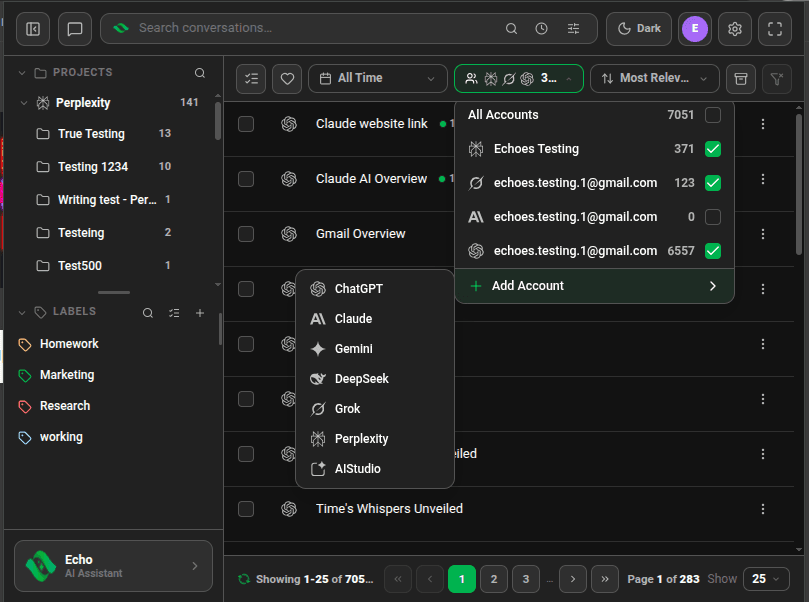
Accounts dropdown listing accounts from Perplexity, Grok, Claude and ChatGPT with checkboxes - 2
Tick or untick accounts
Tick the accounts to search. All Accounts ticks them all. Echoes keeps at least one account ticked.
- 3
Search
Type in the search box and press
Enter. Results from different platforms appear in one list, each with its platform icon. - 4
Narrow to one platform from the search box
Add
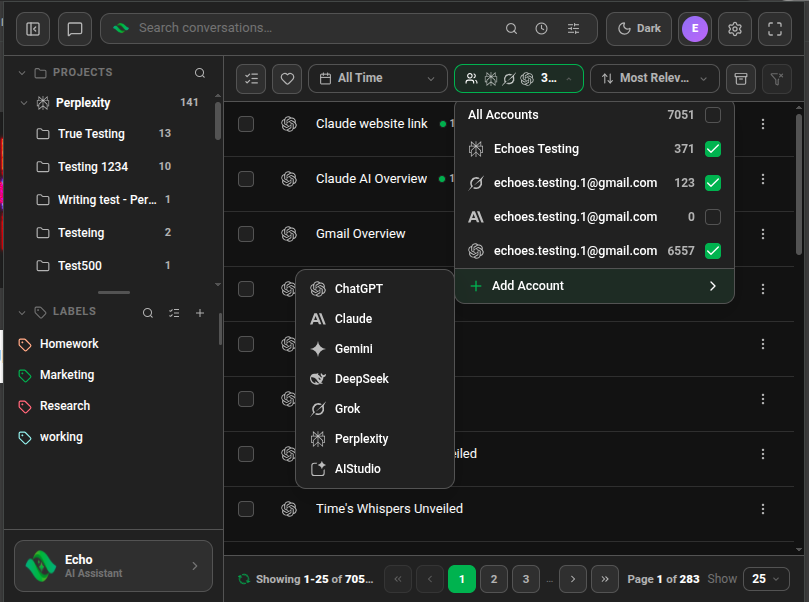
service:and a platform name:chatgpt,claude,gemini,deepseek,grok,perplexityoraistudio.from:works the same way.
Good to know
| Plan | Limit |
|---|---|
| Lite (free) | 20 searches a month, across all platforms |
| Plus & Lifetime | Unlimited |
- ChatGPT results come from ChatGPT's live search, so stay signed in to chatgpt.com in the same browser.
- To add an account, use Add Account at the bottom of the same dropdown. See Connect your AI accounts.
Related tutorials
- ExtensionDesktopConnect your AI accountsAdd ChatGPT, Claude, Gemini, DeepSeek, Grok, Perplexity and AI Studio accounts, several per platform.
- ExtensionDesktopFind a chat with advanced searchUse AND, OR, NOT, exact phrases and filters like label: or date: in one search box.
- ExtensionJump to the exact line that matchedPreview matching lines in the list, then open the chat with every match highlighted.
Try it in Echoes
The free Lite plan covers all seven AI platforms. No card needed.