
Find a chat with advanced search
Type in the search box at the top and press Enter. Combine words with AND, OR and NOT, wrap a phrase in quotes, and add filters such as service:claude or label:work to narrow the results.
5 steps3 minVideo walkthrough
Why it matters
ChatGPT's own search matches titles and a few recent chats. You remember asking about "lease termination" sometime last spring, on ChatGPT or maybe Claude. In Echoes, "lease termination" date:last6months searches the text of chats on both platforms and returns the match in a second.
Operators matter once your history passes a few hundred chats. python NOT django drops 80 chats you don't want, and the match counts on each result show where the words appear.
Step by step
- 1
Type your words and press Enter
Click the search box (Search conversations…), type, then press
Enteror click the search icon. Echoes doesn't search while you type, so the search icon pulses when the box holds a search you haven't run yet.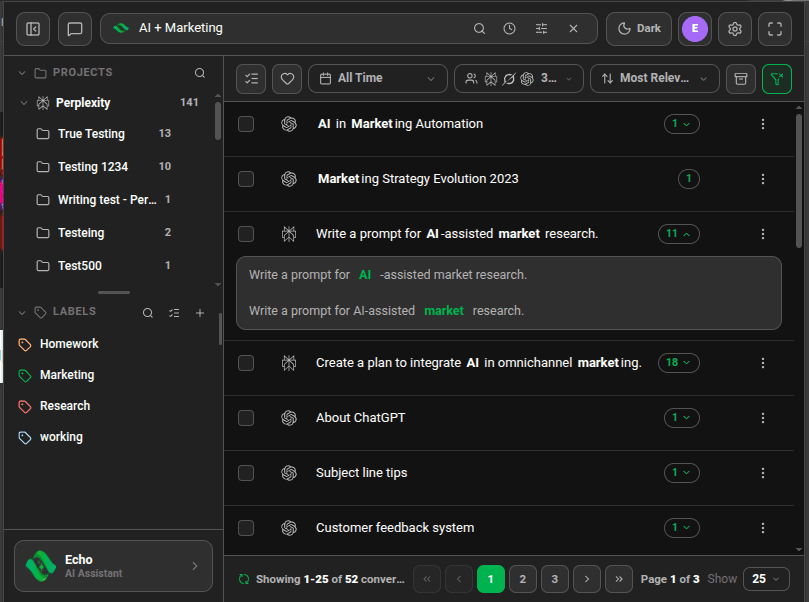
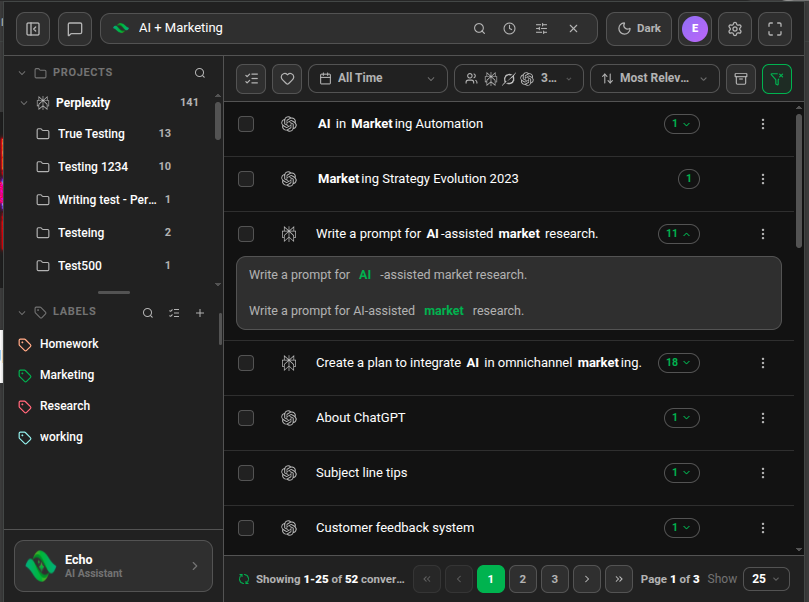
Search for "AI + Marketing" with match counts on each result - 2
Combine words with operators
Words separated by a space must all appear. Use
OR(or|) for either word,NOT(or a leading-) to exclude one, and parentheses to group:(invoice OR receipt) NOT draft. Echoes also matches word forms, sorunningfinds "run" and "runs". - 3
Search an exact phrase
Wrap the words in quotes:
"customer churn". Echoes returns chats that contain those words in that order. - 4
Add filters to the search
Type a filter next to your words.
service:claudelimits to one platform.label:workandproject:"Q3 plan"limit to a label or project.favorite:trueandarchive:trueshow favorites or archived chats.date:lastweek,date:thismonthordate:last30dayslimit by time. - 5
Open the search guide
Click the Echoes logo at the left of the search box (tooltip Search guide). The Echoes Advanced Search guide lists the operators and filters with examples.
Good to know
| Plan | Limit |
|---|---|
| Lite (free) | 20 searches a month, reset on the 1st |
| Plus & Lifetime | Unlimited |
- On Lite, changing a filter while a search is active runs the search again and counts as another search. Set your filters first, then type.
- Label filters match the full label name, so type
label:"client work"rather than part of it. - Operators and filters work while Enable Advanced Search is on (sliders icon at the right of the search box). Turn it off to treat every word as plain text.
- The green button at the right end of the filter bar (Reset Filters) clears the search and every filter at once.
FAQ
Does Echoes search inside the messages, or titles alone?
Inside the messages. Each result shows how many times your words appear, and you can expand that count to read the matching lines.
Is search case-sensitive?
No. Budget, budget and BUDGET return the same chats.
Related tutorials
- ExtensionDesktopSearch ChatGPT, Claude, Gemini and four more AIs at onceOne search covers each account you connected. Narrow it to one platform or one account.
- ExtensionJump to the exact line that matchedPreview matching lines in the list, then open the chat with every match highlighted.
- ExtensionDesktopFilter chats by datePick Today, Last Week, Last 30 Days or a custom range.
Try it in Echoes
The free Lite plan covers all seven AI platforms. No card needed.