
Browse your AI projects in one panel
The Projects panel lists the projects you made on ChatGPT, Claude, Grok and Perplexity, grouped by platform. Click a project to filter the list to its chats.
6 steps3 min
Why it matters
You keep a "Client A" project on ChatGPT and a research project on Claude. On the platforms you switch tabs and try to remember which AI holds which project. In Echoes they sit in one panel, and one click filters the list down to that project.
Echoes reads projects from the platforms, so you don't rebuild your structure. Rename or delete a project in Echoes and the change happens on the platform too.
Step by step
- 1
Open the Projects panel
Click the folder icon on the left rail (tooltip Projects). The PROJECTS panel opens with one group per platform. Click a platform name to expand or collapse it.
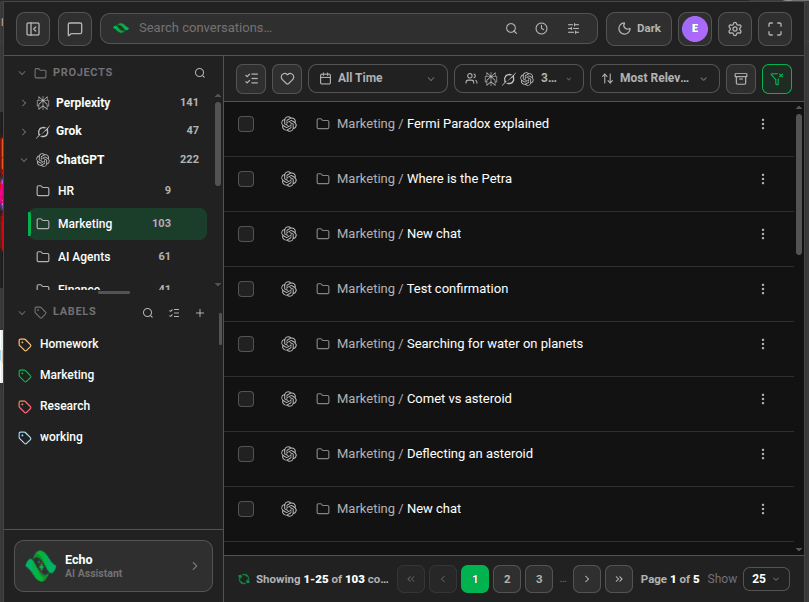
Projects panel with the ChatGPT group expanded and the Marketing project selected - 2
Click a project to filter
Click a project to filter the conversation list to that project's chats. Click it again to clear the filter. In the full-screen dashboard each project shows its chat count.
- 3
Select more than one project
Hold
Ctrl(⌘on Mac) and click to add or remove a project. HoldShiftand click to select the range between the last project you clicked and this one. - 4
Find a project by name
Click the search icon in the PROJECTS header and type part of the name.
- 5
Rename or delete a project
Hover a project and click its ⋮ menu (tooltip Project options). Edit opens the Edit Project dialog, where you change the name and click Save. Delete removes the project from the platform, with its files and chats, after you confirm.
- 6
Move a chat into a project
In the full-screen dashboard, open a chat's ⋮ menu and choose Move to Project, or select several chats and pick Move to Project from the Action menu. Echoes moves them on the platform.
Good to know
| Plan | Limit |
|---|---|
| Lite (free) | Browse and filter: no limit. Move to project: 10 chats per move, 5 moves a month |
| Plus & Lifetime | No limit |
- Gemini, DeepSeek and AI Studio have no projects Echoes can read, so they don't appear in this panel. Use labels to group those chats.
- Projects with no conversations are hidden. The panel also follows the Accounts filter, so a project from an account you switched off won't show.
- You move chats between projects one platform and one account at a time. Grok can't take a chat back out of a workspace.
- Echoes can't create a project. Create it on the platform and it shows up after the next sync.
FAQ
Does deleting a project in Echoes delete it on ChatGPT or Claude?
Yes. Delete removes the project on the platform, with its files and chats. Echoes asks you to confirm first.
Why don't I see my Gemini Gems?
Gemini doesn't expose Gems as projects, so Echoes has nothing to list. Put those chats under a label instead.
Related tutorials
- ExtensionDesktopOrganize chats with labels and sublabelsCreate colored labels, nest them, and tag chats from any AI by menu or by dragging.
- ExtensionDesktopLabel, export or delete many chats at onceSelect chats and act on the whole selection from one Action menu.
- ExtensionDesktopConnect your AI accountsAdd ChatGPT, Claude, Gemini, DeepSeek, Grok, Perplexity and AI Studio accounts, several per platform.
Try it in Echoes
The free Lite plan covers all seven AI platforms. No card needed.